



.svg)



The UPCATET admit card 2026 is expected to be released shortly before the exam for UG, PG, and PhD programmes. Sardar Vallabhbhai Patel University of Agriculture & Technology (SVPUAT), Meerut conducts UPCATET, with the 2026 entrance exam scheduled for 17–18 June 2026. Once it is live, registered candidates can download the hall ticket from upcatetexam.org using your login credentials. Your hall ticket includes your exam date, centre address, reporting time, and important exam-day instructions. Make sure to check all the details carefully—any errors must be reported to the authorities without delay. Without this document, entry to the exam hall won't be allowed.
By the end of this blog, you will know
- How to download your UPCATET admit card 2026 quickly and correctly using your login credentials.
- What details are mentioned on the UPCATET admit card, and why is it important to verify them.
- Key exam day guidelines, documents to carry, and what to do in case of errors in the admit card.
Steps to Access Your UPCATET Admit Card 2026
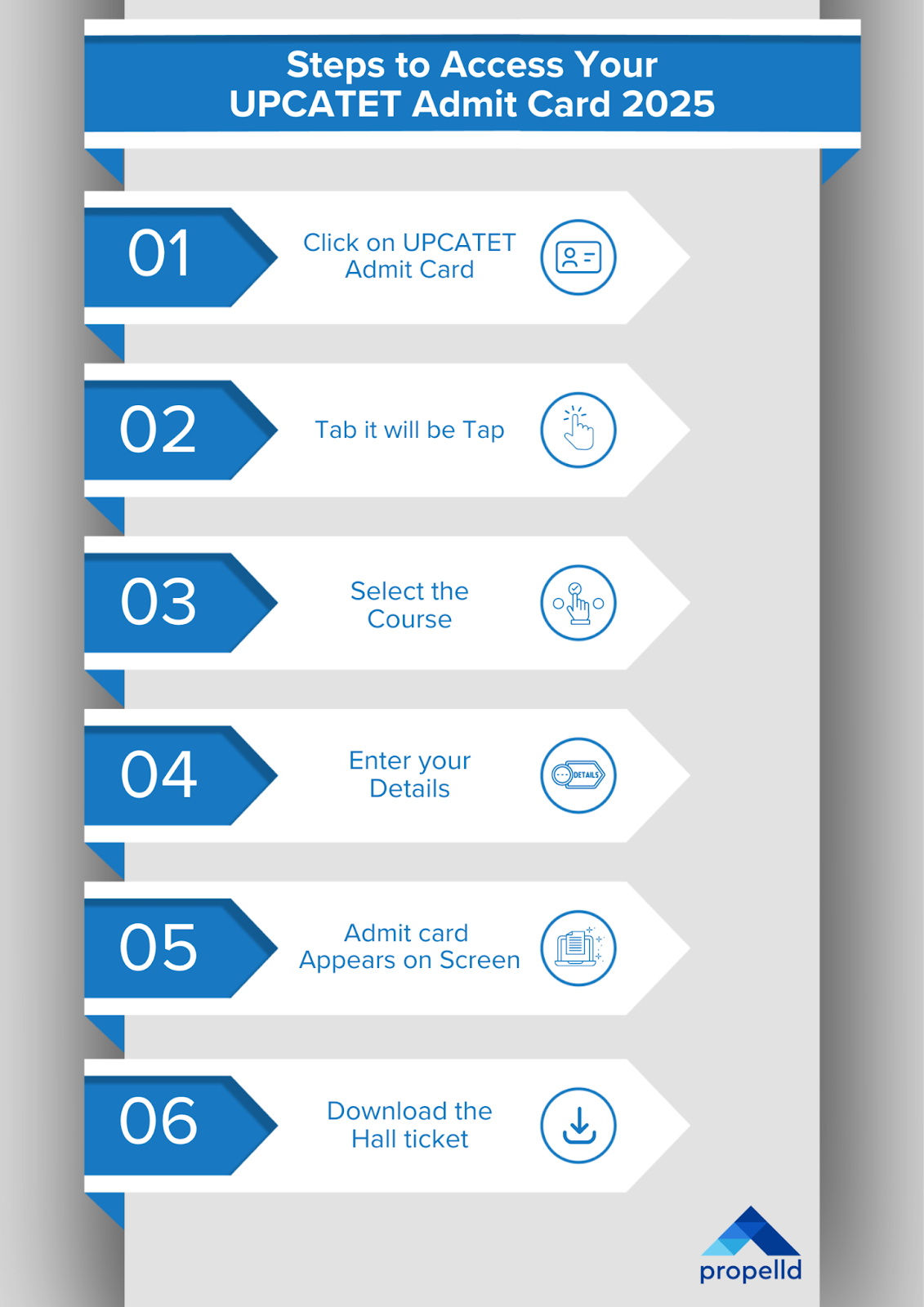
Candidates who have successfully registered for UPCATET 2026 can now access their UPCATET admit card through the UPCATET admit card 2026 official website. Follow the step-by-step guide below to download your admit card in just a few minutes. Here's how you can easily download your UPCATET admit card without any confusion.
Step 1:
Go to the official UPCATET website – upcatetexam.org.
Step 2:
On the homepage, look for the 'UPCATET Admit Card' tab and click on it.
Step 3:
Select the course you've applied for – UG, PG, or PhD.
Step 4:
Enter your registration number and date of birth in the login window.
Step 5:
Once logged in, your UPCATET 2026 admit card will appear on the screen.
Step 6:
Download the hall ticket and take a clear printout. Make sure to keep extra copies for backup.
From agribusiness to rural development, an MBA in Agriculture can lead to meaningful career paths. If tuition costs are holding you back, an education loan for an MBA might be the right solution.
What Does Your UPCATET Admit Card 2026 Contain?
Once downloaded, your admit card (like the NEET PG admit card) becomes your key document for entry to the exam centre. It not only confirms your candidature but also outlines all necessary instructions for exam day. Students must paste a passport-size photograph on the printed admit card, as per the specified guidelines.
Here's what the UPCATET 2026 hall ticket includes:
- Name of the candidate
- Photograph of the candidate
- Roll number allotted
- Date of birth
- Signature of the candidate
- Complete exam centre address
- Schedule of UPCATET 2026 exam
- Registered contact details (address & mobile number)
- Important exam-day guidelines and instructions
Candidates must ensure all details are correct. If there's any error in the information mentioned, reach out to the official UPCATET helpline immediately. Remember, failure to carry the admit card (like the AIAPGET admit card) on the exam day will lead to disqualification from appearing in the test.
Get Your Education Loan Approved 10x Faster—Explore Propelld Now!
UPCATET 2026 Exam Schedule & Admit Card Timeline
From application to campus reporting, here's a detailed timeline of all major events, including the UPCATET admit card release date and counselling rounds. Bookmark this table to stay on track.
|
Event |
Date |
|
UPCATET 2026 Application Process |
25–30 Apr '26 (Closed) |
|
Application Correction Window |
May '26 (Closed) |
|
Last Date for Application Fee Payment |
30 Apr '26 (Closed) |
|
UPCATET Admit Card 2026 Download Window |
Jun '26 (Expected, before exam) |
|
UPCATET 2026 Exam for UG, PG, and PhD |
17–18 Jun '26 |
|
UPCATET 2026 Result Declaration |
Jun '26 (Expected) |
|
Online Counselling Registration & Choice Filling |
Jun–Jul '26 (Expected) |
|
Seat Allotment Result (1st Round) |
Jul '26 (Expected) |
|
Document Uploading (Round 1) |
Jul '26 (Expected) |
|
Document Verification (Round 1) |
Jul '26 (Expected) |
|
Security Fee Submission (Round 1) |
Jul '26 (Expected) |
|
Download of Provisional Allotment Letter |
Jul '26 (Expected) |
|
Reporting at Allotted University |
Jul '26 (Expected) |
|
Document Re-uploading for Correction |
Jul '26 (Expected) |
|
Final Re-verification of Documents |
Jul '26 (Expected) |
|
Next Phase Counselling Registration & Fee Payment |
Aug '26 (Tentative) |
|
Choice Filling & Locking for Counselling Phase 2 |
Aug '26 (Tentative) |
|
Seat Allotment Result (Round 2) |
Sep '26 (Tentative) |
|
Uploading of Documents by Allotted Candidates |
Sep '26 (Tentative) |
|
Security Fee Submission (Round 2) |
Sep '26 (Tentative) |
|
Admission Reporting at Allotted University |
Sep '26 (Tentative) |
|
Fresh Counselling Registration & Fee Submission (if seats remain) |
Sep '26 (Tentative) |
|
Issuance of Counselling Letters |
Sep '26 (Tentative) |
|
Physical Reporting at the Campus for Document Verification |
Sep '26 (Tentative) |
|
Offline Counselling at Meerut Campus |
Sep '26 (Tentative) |
|
Final Date to Complete Admission Formalities |
Oct '26 (Tentative) |
|
Special Round Registration for UG, PG, and PhD |
Nov '26 (Tentative) |
|
Download Counselling Letter for Special Round |
Nov '26 (Tentative) |
|
UG Candidates: Campus Reporting for Final Counselling |
Nov '26 (Tentative) |
|
PG Candidates: Final Campus Counselling |
Nov '26 (Tentative) |
|
PhD Candidates: Final Campus Reporting & Document Verification |
Nov '26 (Tentative) |
|
Final Registration for Physical Counselling (UG, PG, PhD) |
Nov '26 (Tentative) |
What to Do if There's an Error in Your Admit Card
It's important to check your admit card the moment it is released. If you notice any errors—whether it's a typo in your name or the wrong exam centre—act immediately. Here's what you need to do:
Identify the Error
Check for mismatches in your name, photograph, signature, exam date/time, or location.
Don't Alter It Manually
Avoid correcting the admit card yourself. Handwritten fixes won't be accepted at the exam centre.
Reach Out to Authorities
Contact the UPCATET helpline or email support team as listed on the official website for assistance.
Download the Corrected Version (If Applicable)
If instructed, re-login to the official portal and download the updated version before exam day.
Double-Check Early
Always check the admit card as soon as it's released. Last-minute fixes may not be possible.
Starting your undergraduate degree? Cover tuition, books, and living costs with a student loan made just for UG programs.
UPCATET 2026 Exam Day Instructions
Before you head out for the exam, make sure you're fully prepared, not just with your studies, but with the documents and details required on the day. From reporting time to what not to bring, here's a checklist every UPCATET 2026 aspirant should go through:
Documents to Carry on Exam Day
Before leaving for the UPCATET 2026 exam, double-check that you've packed all essential documents. Entry to the exam centre will not be permitted without these items, regardless of your registration status or performance in the application process. Here's a quick list of what you must carry with you:
|
Mandatory Item |
Details |
|
Printed UPCATET 2026 Admit Card |
Must be clear, untampered, and downloaded from upcatetexam.org |
|
Valid Photo ID Proof |
Aadhaar card, PAN card, Voter ID, Passport, or Driving Licence |
|
Passport-size Photograph |
Same as uploaded in the application form (carry 1–2 just in case) |
|
Stationery (if allowed) |
Pen/pencil as per instructions on admit card (varies by subject) |
Items Not Allowed Inside the Exam Hall
- Mobile phones, smartwatches, or any digital devices
- Notes, books, or rough papers
- Wallets, bags, sunglasses, or jewellery
- Calculators or any electronic gadgets (unless specifically permitted)
After going through the exam day rules and requirements, make sure to check which degree programmes are available through UPCATET 2026.
Get a 100% digital education loan from Propelld—fast, hassle-free, and paperless.
Need funds for your PhD? Explore which banks offer education loans for PhD, the required documents, and when collateral might be needed.
Programmes Available Through UPCATET 2026
Candidates who clear UPCATET can secure a seat in various agricultural and allied science programmes across participating universities in Uttar Pradesh. Below is a breakdown of all undergraduate and postgraduate courses available through this exam:
Undergraduate Courses Offered via UPCATET
- BSc (Hons) Agriculture
- BSc (Hons) Horticulture
- BSc (Hons) Forestry
- BSc (Hons) Home Science
- BVSc & AH
- BFSc (Bachelor of Fisheries Science)
- BTech Agricultural Engineering
- BTech Dairy Technology
- BTech Biotechnology
- BTech Computer Science
- BTech Mechanical Engineering
- B.Tech Electronics & Communication Engg.
Postgraduate Courses Offered via UPCATET
- MSc in Agriculture
- MSc in Home Science
- MSc in Veterinary Science
- MSc in Horticulture
- MVSc (Master of Veterinary Science)
- MTech in Agricultural Engineering
- MTech in Mechanical Engineering
- MTech / MSc in Biotechnology
- MBA in Agribusiness
Need financial support for your studies? Explore Uttar Pradesh state scholarships and find out if you qualify and what benefits are available.
Whether you're preparing for the UPCATET exam, waiting for counselling updates, or exploring course options, staying informed about dates, eligibility, and documents is crucial. Make sure you've downloaded your UPCATET 2026 admit card on time, double-checked the information, and followed the latest counselling schedule based on your programme. And if you're exploring ways to fund your agriculture studies, Propelld can help you out with fast education loans.
Propelld makes education loans easy, fast, and student-friendly. It offers 100% digital and paperless processes, meaning you can apply from anywhere without visiting a branch. There's no need for collateral, and only minimal documents are required. With flexible repayment options and quick approvals, Propelld is a convenient and hassle-free way to fund your education courses.
Take the next step in your academic journey - Apply for an education loan today!


